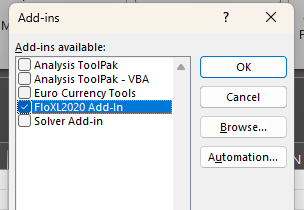
To ensure that the add-in loads each time Excel starts, go to Excel > File > Options > Add-ins > Manage dropdown - Excel Add-ins > Go.
Make sure that the FloXL add-in is listed and the checkbox next to it is selected.

Modified on: Wed, 26 Aug, 2026 at 4:42 PM
To ensure that the add-in loads each time Excel starts, go to Excel > File > Options > Add-ins > Manage dropdown - Excel Add-ins > Go.
Make sure that the FloXL add-in is listed and the checkbox next to it is selected.
Did you find it helpful? Yes No
Send feedback